
(New!) Document Vault
Clients’ treasured documents, all within reach
Hang up the shovels! With the newest version of Document Vault, clients no longer have to dig in folders for important digital treasures.
Introducing the new Document Vault
The Wealth Access team updated Document Vault to organize your clients’ files more efficiently. The Document Vault updated UI makes it easier to securely find and organize documents inside it.
What did we change?
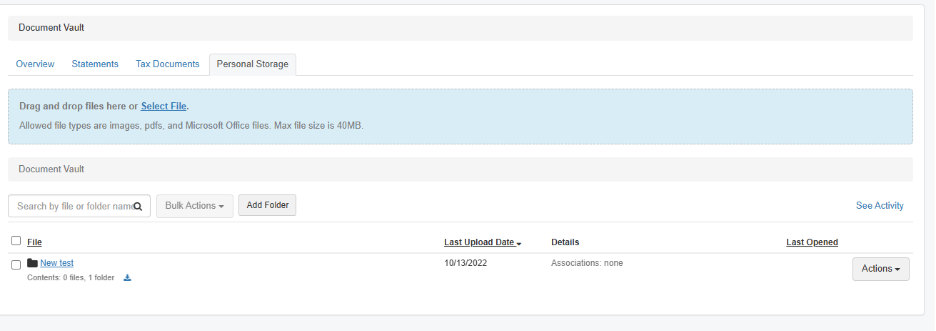
We replaced folders with tabs at the top of the UI for easier navigation. It’s faster for your clients to find documents securely, with less clicking or loading into folders. There’s cleaner categorization, and documents are grouped by type instead of buried down the page.
Some new example tabs:
- Statements
- Tax docs
- Personal storage
What do you need to do?
This is a critical update, so you should contact your CSM if you haven’t heard from them yet. This update does not require any technical lift from your team. Migration is easy. All historical data will carry over, so no need to worry about losing files. Schedule the new Document Vault upgrade with Wealth Access as soon as you can for a better document experience. We will reach out to remind you about this upgrade.
Here are the benefits to share with your clients: “Now, it’s easier to organize and retrieve your important documents. There are new tabs at the top of your Document Vault to categorize statements, tax documents, and personal storage.”
Ready to make the move? Reach out to us to get things scheduled.
What is the Document Vault?
The Document Vault is a secure place to store, view, and manage financial documents in Wealth Access. The Document Vault gives you one secure, centralized place for financial documents. It makes it easy to collaborate with advisors, securely store sensitive information, and keep a long-term record of important documents. Everything stays protected, accessible, and connected to a client’s full financial picture.
How you can use the Document Vault
- Access important financial documents anytime
- Keep documents securely stored in one place
- Share documents with your advisor when needed
How it works
Documents are encrypted and stored securely. Access depends on your permissions and firm settings.
- Select Documents from the left side navigation
- Open the Document Vault
- Select Upload
- Choose the file from your device
- Select Save or Upload
- Once uploaded, the document will appear in your vault.
- You can keep it private or share it with your advisor, depending on your selection and your firm’s settings.
You’ll see a list of available documents based on your access and permissions.